One shopping list, shared by the whole house
SpreeSync keeps one grocery list for everyone you live with. When someone adds milk at home, it is on the list in the shop a moment later.
There is no list to forward and no screenshot to send. Each household has its own lists, and everyone in it sees the same thing, even after a stretch without signal.
How it works
Create your household
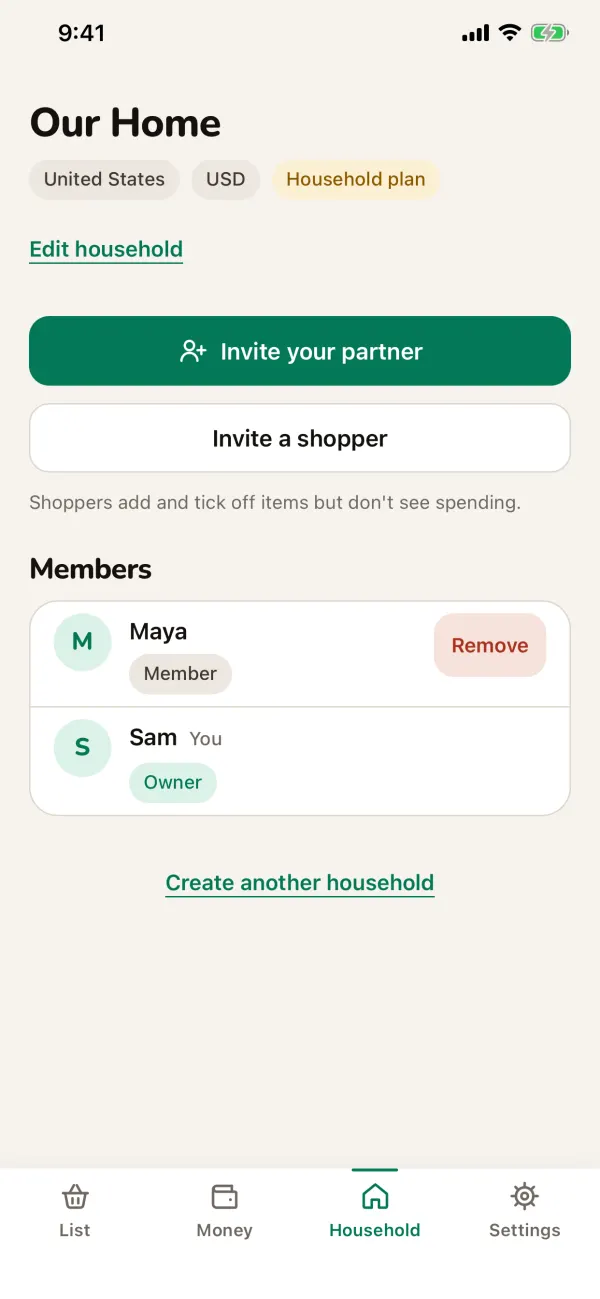
The person who sets it up becomes the owner. Give the household a name, and pick its language and currency.
Invite with a link
Send the invite link in any chat, or read out the eight-character code. The other person taps it, installs the app if needed, and joins.
Give everyone a role
Members share the lists and the spending. A shopper, say a teenager or a helper, can add and tick items but never sees what the household spends.
Add, tick, and watch it sync
Changes show up for everyone right away. Changes made offline wait on the phone and sync when you are back online.
Who it is for
Couples and families who keep forgetting who was meant to buy what. Housemates who split the weekly shop. Anyone who helps a parent or relative with their groceries.
If more than one person shops for the same home, one shared list saves the second trip and the second bottle of olive oil.
Questions
Do the others need an account? Yes. Everyone signs in with a code sent to their email, or with Apple or Google. There is no password to remember.
Can a shopper see what we spend? No. Shoppers can add items and tick them off. Spending is shown to the owner and members only.
What if two people change the same item? The latest change wins, and every phone ends up with the same list.
Is the shared list free? Yes. The shared list, every member and offline sync are on the free plan, and adding and ticking items by hand has no limit.
Try it with your household
SpreeSync is free to download on iPhone and Android, in 12 languages.
More features
Voice and paste notes
Say what you need or paste a chat message; it comes back sorted by aisle, in 12 languages.
Shopping mode
Tell the house you are at the shop, so they can add what they forgot while you are there.
Receipts and grocery budget
Scan the receipt and see spending by section and store, with budgets, price history and a monthly report.
Kitchen
Know what is in the fridge, freezer and cupboard, and what to use first.
Meal ideas
Meal ideas for 1 to 5 days from what you already have, with recipes, cost and calories.
From the blog
How to reduce food waste at home: a 10-minute weekly routine
A simple weekly fridge check, first-in-first-out, storage basics and a smarter shopping list: practical steps to waste less food at home.
Ramadan 2027 grocery list and budget: a practical plan
A Ramadan grocery list sorted by supermarket section, plus a simple plan to budget the month, waste less food and share the list with your family.
Meal planning on a budget: a weekly method for families
Plan a week of family meals on a budget: start from what you have, cook once and eat twice, and turn the plan into one shopping list.