Scan the receipt, see where the grocery money goes
Take a photo of the receipt after the shop. SpreeSync reads the store, the items and the prices, ticks the matching items off your list and adds the purchase to your household's spending.
Receipts in other currencies are converted to your household's currency, so every shop counts towards the same month.
How it works
Scan the receipt
Tap Scan and take a photo. Location and camera details are removed on your phone before the photo is sent.
Check what it read
The store, the lines and the prices come back for you to confirm. The AI can misread a line, so look before you save.
Spending adds up
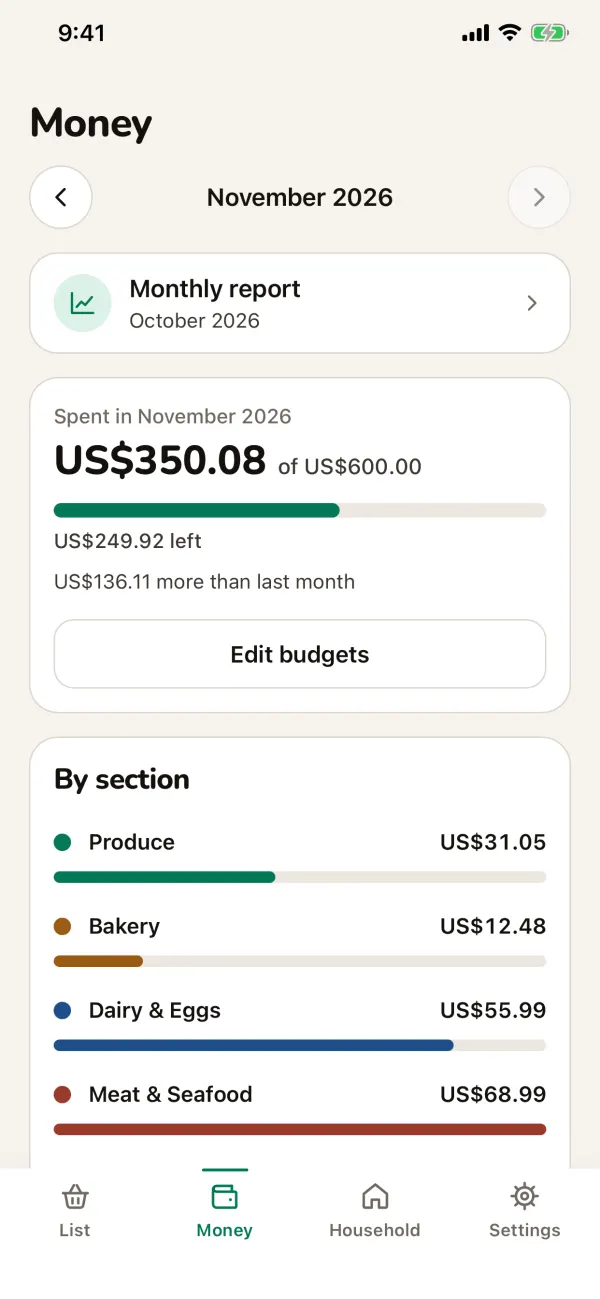
Each receipt adds to the month, split by store section and by store.
Set a budget
Set a monthly grocery budget and get an alert at 80% and at 100%.
Read the monthly report
See your top stores, what you buy most and the prices that went up, and export to CSV or Excel.
Who it is for
Households that want to keep grocery spending in check without keeping a spreadsheet.
Families who share the cost of food and want one honest picture of the month. Shoppers never see spending, and you can set a spending cap for a shopper if you want one.
Questions
What is free, and what needs Pro? The free plan includes three receipt scans a month and the current month's spending by section. Pro adds unlimited scans, spending history by month and store, budgets with alerts, price history, the monthly report and export.
How much does Pro cost? US$5.99 a month or US$49.99 a year in the US; your store shows the price in your currency. One subscription covers the whole household, and a 7-day free trial starts when your first receipt matches an item on your list.
What happens to the receipt photo? AI reads it to fill in your spending. The photo is kept for 90 days, or 24 months with Pro, and the lines stay until you delete the receipt.
Who can see our spending? The owner and members. Shoppers use the list but never see spending.
Try it with your household
SpreeSync is free to download on iPhone and Android, in 12 languages.
More features
Shared shopping list
One list for everyone you live with, synced live, with roles and an invite link.
Voice and paste notes
Say what you need or paste a chat message; it comes back sorted by aisle, in 12 languages.
Shopping mode
Tell the house you are at the shop, so they can add what they forgot while you are there.
Kitchen
Know what is in the fridge, freezer and cupboard, and what to use first.
Meal ideas
Meal ideas for 1 to 5 days from what you already have, with recipes, cost and calories.
From the blog
How to track grocery spending with receipts
Why receipts beat memory, what to look for on each one, and how to track grocery spending by hand or with an app that reads the photo for you.
How to reduce food waste at home: a 10-minute weekly routine
A simple weekly fridge check, first-in-first-out, storage basics and a smarter shopping list: practical steps to waste less food at home.
Ramadan 2027 grocery list and budget: a practical plan
A Ramadan grocery list sorted by supermarket section, plus a simple plan to budget the month, waste less food and share the list with your family.